SMART
Note
This guide covers the SMART Trait Store API – the endpoints reached through
SmartTraitStoreConfig and q2_smart.ts_endpoints. It does not cover the older
q2_smart.endpoints SMART API.
Overview
What is SMART?
Q2 SMART is a targeting and messaging platform that will help FI marketers target messaging in online banking (including banner ads) based on user behavior, and easily manage multiple customized promotional campaigns.
What is a Trait?
A trait is a user-level data metric or model that represents a characteristic or behavior about an online banking user. It is stored in the form of a key and value.
What is an Audience?
An Audience is a logical collection of Traits. Audiences are created by our customers in order to identify interesting groups of users that they can target in SMART or Composable Dashboard today.
How do I interact with SMART?
The SDK maintains the q2-smart package in partnership with the Q2 SMART team. You can install the q2-smart package with the q2 upgrade command and selecting the q2-smart package.
This will install a package that acts as a wrapper to the internal SMART API.
Online form extensions also have a helper property that will allow for easy interaction. For example:
config = SmartTraitStoreConfig("smarttest-dev", "tps-reports")
self.smart_ts = config
audiences = await self.smart_ts.audience.get()
self.logger.debug(audiences.audience_list[0])
audience_id = audiences.audience_list[0].id
users = await self.smart_ts.audience.get_users(audience_id)
count = await self.smart_ts.audience.get_count(audience_id)
What are those values used for the configuration?
The SMART Trait Store Configs takes two values. These values are environment stack identifiers (also known as env stacks).
The first value is the source, and identifies the requester. This is used for a number of things like auditing and permissions.
The second value is the target. The target env stack can usually be found in the self.hq_credentials.env_stack variable.
Deployment
Deploying to a Caliper Sandbox
Ensure
q2-smartis installed (q2 upgrade).Deploy the extension to a sandbox environment (
q2 install).The extension dashboard provides a UI with preset test scenarios for audiences and traits.
Note
In sandbox environments, your extension will communicate with the mock SMART Trait Store API by default (see Testing section below).
Note
No Q2MSG key exists for your company’s env stack in a sandbox, so sign with the shared Q2-owned KRAYT-DEMO
env stack there instead. Pass it as q2msg_override and leave source as your real <company>-dev env
stack – source is the identity the Trait Store audits and permissions against, while q2msg_override
changes only which key signs the request:
source = f"{company}-{env_suffix}"
override = "KRAYT-DEMO" if is_corporate else None
config = SmartTraitStoreConfig(source, target, q2msg_override=override)
Your extension then keeps one identity in every environment, and only the signing key changes. Q2MSG keys of your own are needed in staging and production only.
Deploying to Staging and Production
When creating a deployment ticket for an SDK extension that uses the q2-smart library, include the following requests in your ticket:
Request that Q2MSG keys be created and enabled for your source env stack. The env stack is your company name in caliper plus the environment suffix –
<company>-stgin staging,<company>-prdin production.Request that your Q2MSG envstack be fetched at deploy time.
These configurations are required for your extension to communicate with the real SMART Trait Store API.
Provisioning Errors
Trait Store calls are signed with a Q2MSG HMAC key belonging to your source env stack. Until those keys exist, and
until the Trait Store recognizes your source env stack, every staging and production call fails. In a sandbox, sign
with KRAYT-DEMO instead – see Deploying to a Caliper Sandbox.
Recognizing the error. q2-smart raises a typed exception per case, so neither is mistakable for a genuine
outage. Match on the message as well as the type:
Q2SmartConfigurationErrorwith a message likeNo Q2MSG HMAC key is configured for envstack 'acmebank-prd'– no key exists for the env stack being signed with.Q2SmartAuthenticationErrorwith a message likeTrait Store rejected envstack 'acmebank-prd' for target 'acmebank'– a key exists, but the Trait Store does not accept that source.
Resolving it. Both usually mean the env stack named in the message has not been provisioned. Raise a deployment ticket containing the requests listed under Deploying to Staging and Production, quoting that env stack name. Provisioning a key for the first time and re-provisioning a rotated one go through the same ticket.
Handling it in code. Until provisioning lands, catch the two together – there is nothing to do differently for each:
from q2_smart.exceptions import Q2SmartAuthenticationError, Q2SmartConfigurationError

try:
    audiences = await api.audience.get()
except (Q2SmartConfigurationError, Q2SmartAuthenticationError):
    self.logger.exception("SMART env stack is not provisioned")
Developing with q2-smart
The SmartTraitStoreDemo SDK extension in our examples repo is a demo that exercises a subset of what the mock service supports (e.g. it does not cover all error scenarios or direct trait config lookup).
Note
Pay particular attention to how the source envstack is determined based on the environment in the example repo.
Testing with SMART Trait Store
A mock service that simulates SMART Trait Store API is available for testing when developing in a sandbox without connecting to the real infrastructure.
Exercising the Endpoints
All v2 SMART endpoints are available at:
BASE_URL="https://dev.q2api.com/v2"
Refer to the SMART documentation under the Caliper API V2 section for all available SMART Trait Store endpoints.
Testing Traits with Mock Service
The following traits are available for testing:
Trait ID |
Type |
|---|---|
|
enum |
|
string |
|
float |
|
date |
|
bool |
The following traits are reserved for specific error testing:
Trait ID |
Type |
Simulated Error |
|---|---|---|
|
bool |
Permission error (422) |
|
date |
Permission error (422) |
|
string |
Permission error (422) |
|
bool |
Internal system error (500) |
Testing Audiences with Mock Service
The following audiences are available for testing:
Audience Name |
Audience ID |
Audience Type |
Audience Size |
|---|---|---|---|
|
|
Global |
50,000 |
|
|
Global |
25,000 |
|
|
Global |
25,001 |
|
|
FI Specific |
0 |
|
|
FI Specific |
5,000 |
|
|
Simplified |
0 |
Note
You do not need any additional configuration in order to use the mock service. If you need to point to a different
Trait Store for any reason, set the Q2SDK_SMART_TS_URL environment variable to its base URL, including the
trailing slash. It overrides the environment-derived default for every q2-smart Trait Store call.
This is not the same variable as Q2SDK_SMART_URL, which configures the older SMART API used by online form
extensions and has no effect on the Trait Store.
Creating Simplified Audiences
Simplified audiences are audiences created programmatically via the SDK using trait-based query logic. Unlike native audiences created in the Audience Builder UI, simplified audiences can be both created and deleted via the SDK, allowing you to dynamically manage audience targeting in your extensions.
API Parameters and Validation Rules
Request Structure
To create a simplified audience, use the following SDK method:
audience_id = await api.audience.create_simplified_audience(
    name="Audience Name",
    service="your_extension_name",
    query={
        "include": { "and": [...] },
        "exclude": { "and": [...] }  # optional
    },
    description="Optional description"  # optional
)
Understanding the Parameters
When creating a simplified audience via the SDK, you provide the following parameters:
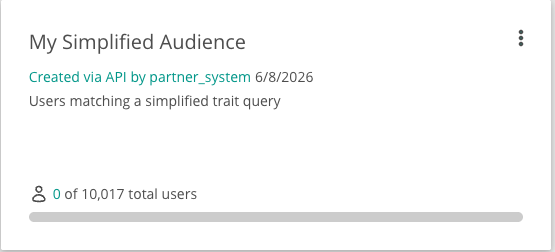
name - The display name for the audience. This is what users will see when browsing audiences in the Audience Builder dashboard.
service - Identifies the extension or service that created the audience. Use a descriptive, stable identifier for your extension to distinguish which API-created audiences belong to which integration.
query - The trait-based query structure that defines audience membership. This must follow the include/exclude grammar with valid operators as described in the sections below.
description (optional) - Additional metadata describing the audience’s purpose or target criteria. Useful for documentation and clarity when managing multiple audiences.
How the service field appears in Audience Builder:
Validation Constraints
The API enforces the following constraints when creating simplified audiences:
Field |
Required |
Type |
Constraints |
|---|---|---|---|
|
Yes |
string |
Non-empty, max 100 characters |
|
Yes |
string |
Non-empty, max 30 characters |
|
Yes |
dict |
Must pass SimplifiedQueryParser validation |
|
No |
string |
Max 200 characters if provided |
Query Structure
Queries define trait-based conditions using this structure:
{
    "include": {
        "and": [
            { "or": [ conditions ] }
        ]
    },
    "exclude": {  // optional
        "and": [
            { "or": [ conditions ] }
        ]
    }
}
include(required) - Users matching these conditions are includedexclude(optional) - Users matching these conditions are removedandarray - All OR groups must matchorarray - At least one condition must match
Understanding AND/OR Logic
The structure follows a pattern: each and group contains one or more or groups, and each or group contains one or more trait clauses.
For example:
include.and = [
    { or: [A, B] },
    { or: [C] },
    { or: [D, E] }
]
This translates to:
(A OR B) AND C AND (D OR E)
The exclude block uses the exact same structure as include. Users matching the exclude conditions are removed from the audience after the include conditions are applied.
Query Syntax and Rules
The following operators are available for different trait types:
Operator |
Allowed Types |
Meaning |
Query |
Description |
|---|---|---|---|---|
|
bool |
Exact equality |
|
Logged in to online banking via mobile phone |
|
enum, string |
Matches any one of the supplied values |
|
Home address in California, New York, or Texas |
|
float, date |
Greater than or equal to (inclusive lower bound) |
|
Has at least 20 average monthly logins |
|
float, date |
Less than or equal to (inclusive upper bound) |
|
Has at most 10 consumer loans |
|
float, date |
Between two values (inclusive lower and upper bound) |
|
529 plan transaction within the last year |
Building Simplified Audience Queries
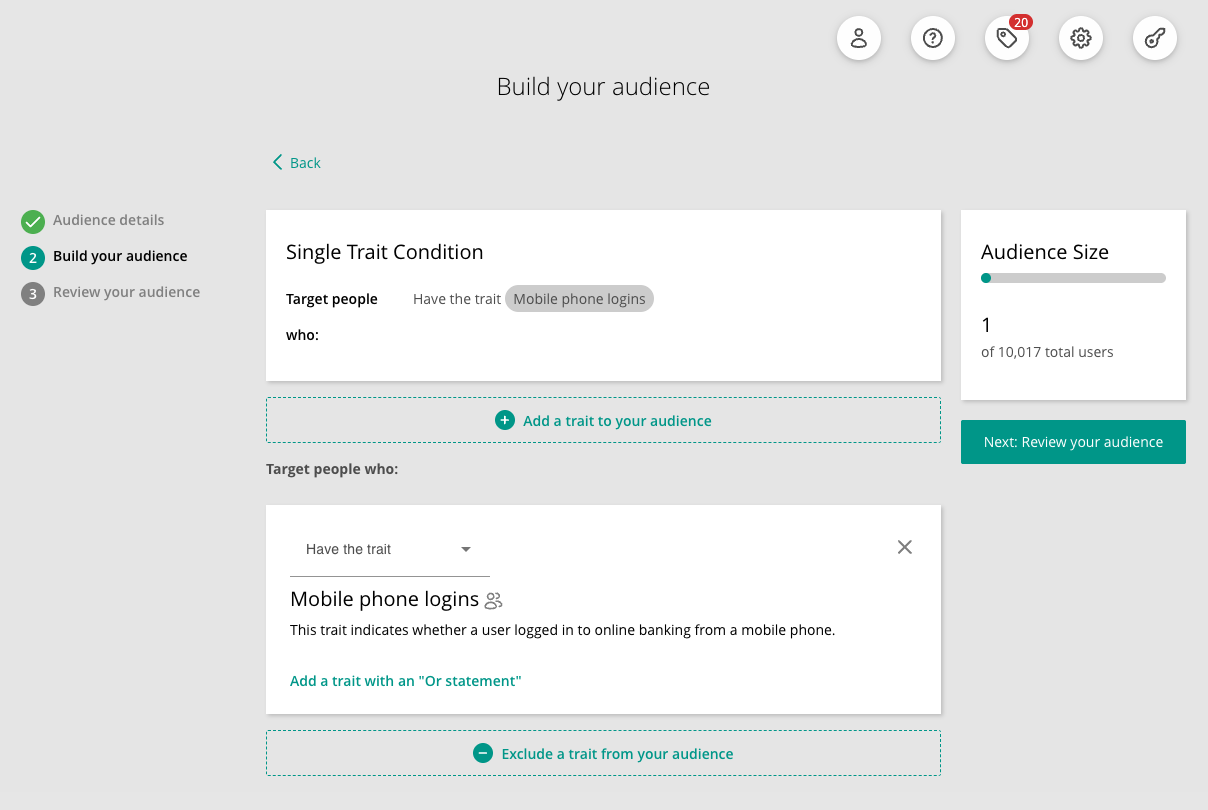
1. Single Trait Condition
How it appears in Audience Builder:
{
    "include": {
        "and": [
            {
                "or": [
                    { "trait": "phone_boolean", "operator": "eq", "value": true }
                ]
            }
        ]
    }
}
INCLUDE users who have:
logged in to online banking via mobile phone
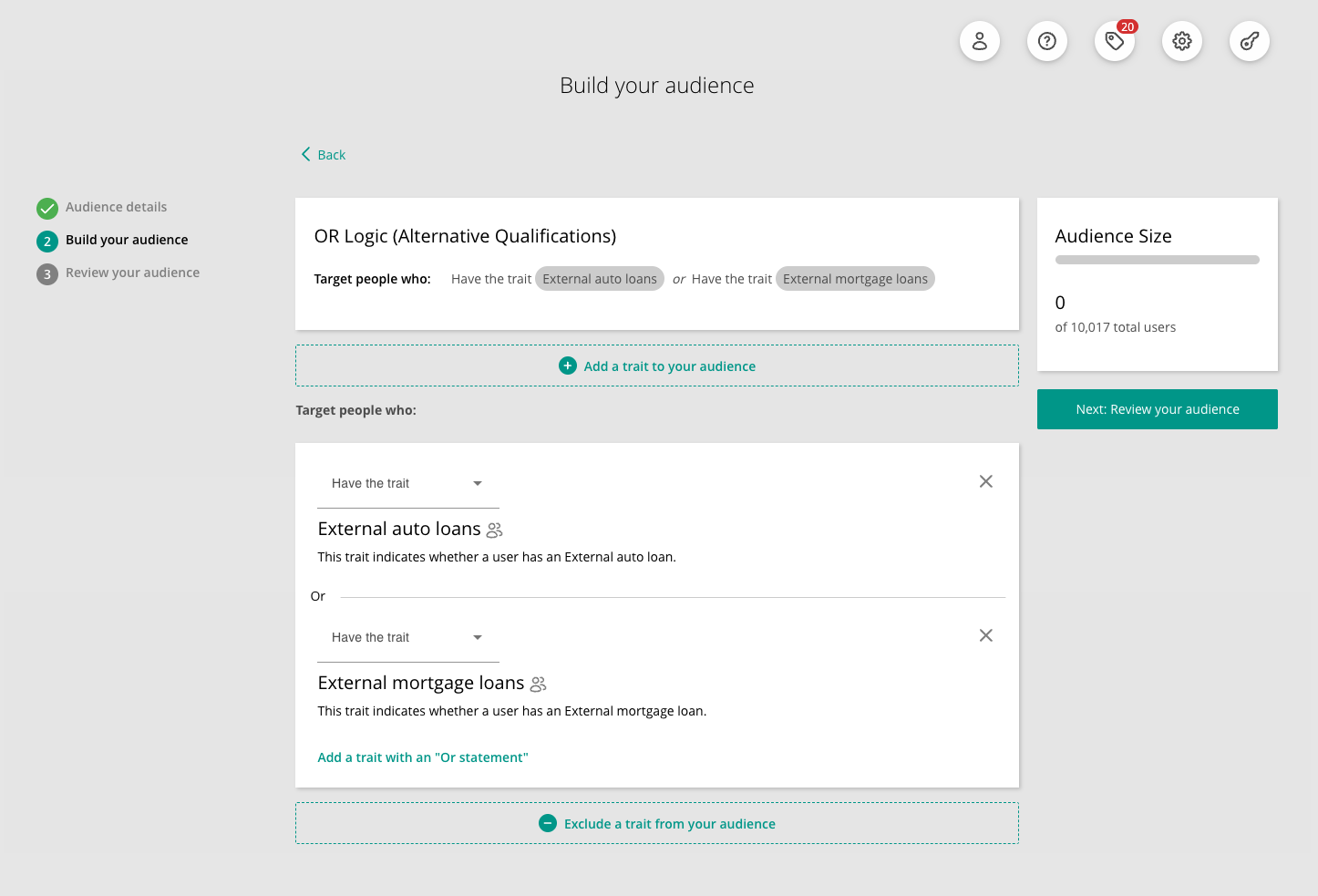
2. OR Logic (Alternative Qualifications)
How it appears in Audience Builder:
{
    "include": {
        "and": [
            {
                "or": [
                    { "trait": "pfm_boolean__auto_loan", "operator": "eq", "value": true },
                    { "trait": "pfm_boolean__mortgage", "operator": "eq", "value": true }
                ]
            }
        ]
    }
}
INCLUDE users who have:
an external auto loan OR an external mortgage loan
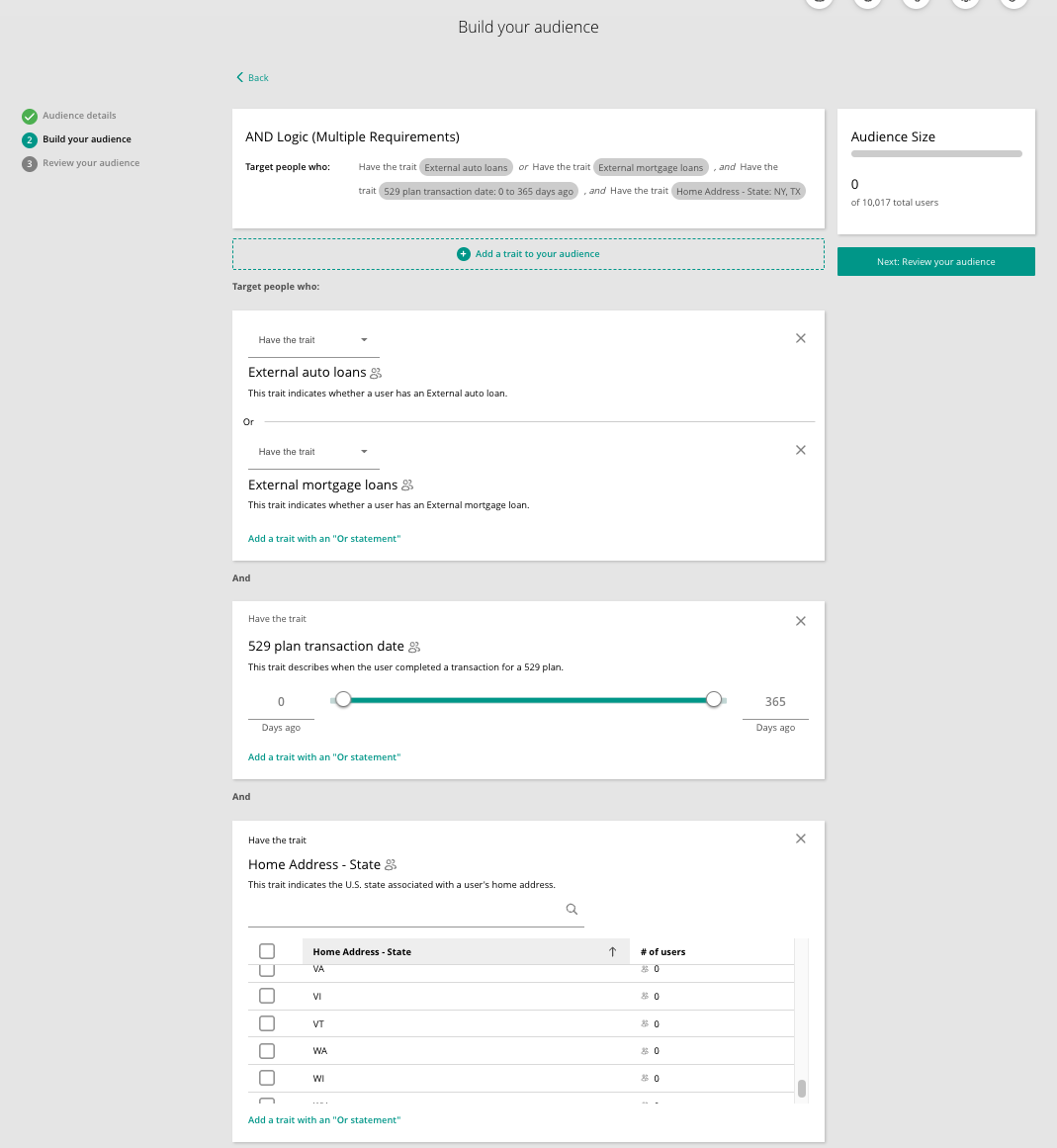
3. AND Logic (Multiple Requirements)
How it appears in Audience Builder:
{
    "include": {
        "and": [
            {
                "or": [
                    { "trait": "pfm_boolean__auto_loan", "operator": "eq", "value": true },
                    { "trait": "pfm_boolean__mortgage", "operator": "eq", "value": true }
                ]
            },
            {
                "or": [
                    { "trait": "product_recency__plan_529", "operator": "range", "value": [0, 365] }
                ]
            },
            {
                "or": [
                    { "trait": "home_address_state_us", "operator": "in", "value": ["NY", "TX"] }
                ]
            }
        ]
    }
}
INCLUDE users who have:
an external auto loan OR an external mortgage loan
AND completed a 529 plan transaction within the last year
AND have a home address in New York, or Texas
4. Include + Exclude
How it appears in Audience Builder:
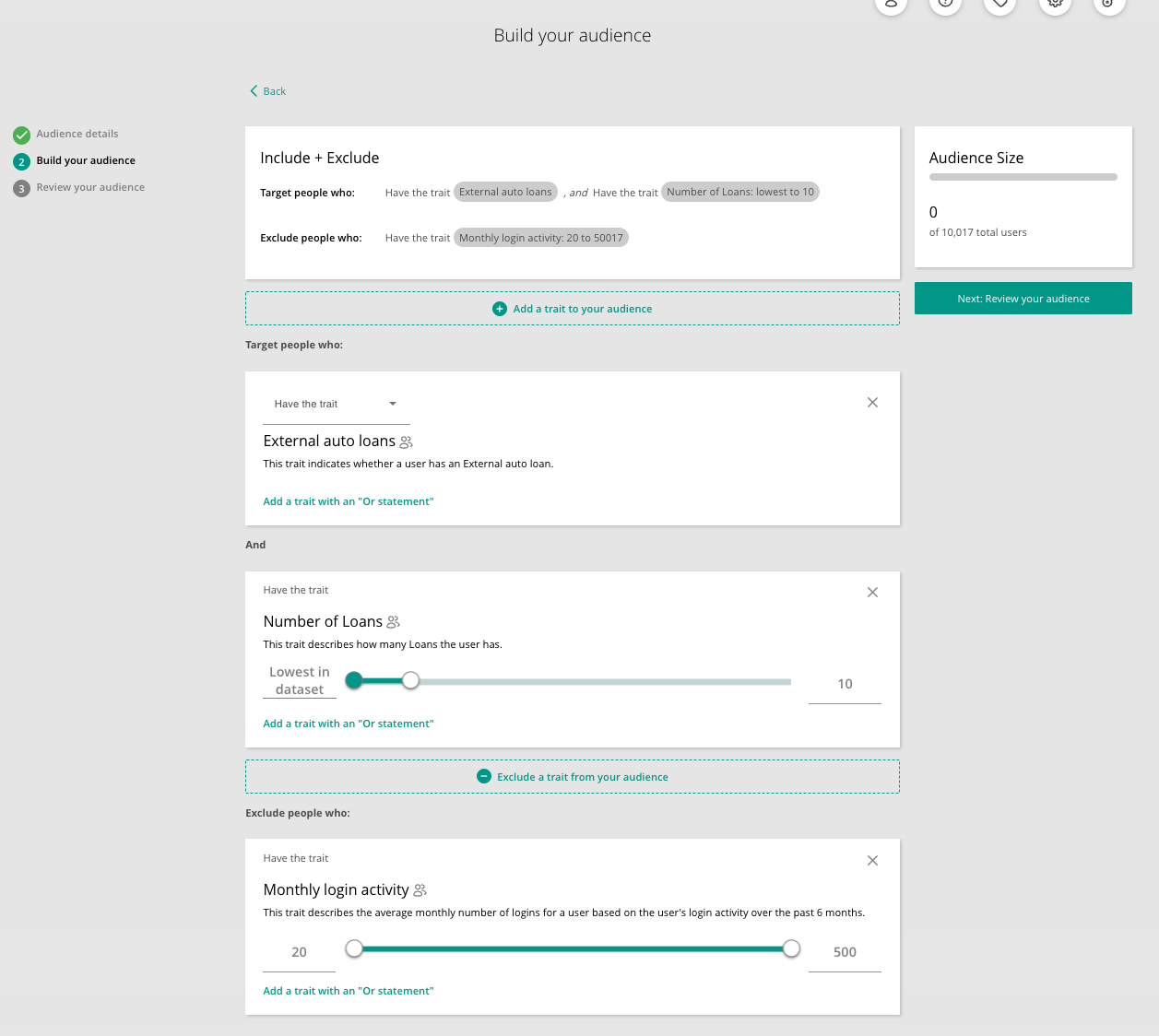
{
    "include": {
        "and": [
            {
                "or": [
                    { "trait": "pfm_boolean__auto_loan", "operator": "eq", "value": true }
                ]
            },
            {
                "or": [
                    { "trait": "product_count__consumer_loan", "operator": "lte", "value": 10 }
                ]
            }
        ]
    },
    "exclude": {
        "and": [
            {
                "or": [
                    { "trait": "average_monthly_logins", "operator": "gte", "value": 20 }
                ]
            }
        ]
    }
}
INCLUDE users who have:
an external auto loan
AND at most 10 consumer loans
EXCLUDE users who have:
20 or more average monthly logins
Testing Simplified Audiences with Mock Service
The mock service validates your query structure and returns appropriate success/failure responses, allowing you to test query syntax before deploying to production.
Example Test Query
Below is an example query that targets users with either an external auto loan or mortgage, who have a limited number of consumer loans:
{
    "include": {
        "and": [
            {
                "or": [
                    { "trait": "pfm_boolean__auto_loan", "operator": "eq", "value": true },
                    { "trait": "pfm_boolean__mortgage", "operator": "eq", "value": true }
                ]
            },
            {
                "or": [
                    { "trait": "product_count__consumer_loan", "operator": "lte", "value": 10 }
                ]
            }
        ]
    }
}
Testing Query Validation via SDK
Use the SDK to validate your query structure:
import asyncio
import logging
from q2_smart.smart_trait_store_api import SmartTraitStoreAPI
from q2_smart.smart_trait_store_config import SmartTraitStoreConfig
from q2_smart.async_local_cache_client import AsyncLocalCacheClient

async def test_query_validation():
    logger = logging.getLogger(__name__)
    cache = AsyncLocalCacheClient()
    config = SmartTraitStoreConfig("your-extension-dev", "target-envstack")
    api = SmartTraitStoreAPI(logger, config, cache)

    audience_id = await api.audience.create_simplified_audience(
        name="Test Limited Loan Customers",
        service="your_extension_name",  # max 30 characters
        query={
            "include": {
                "and": [
                    {
                        "or": [
                            { "trait": "pfm_boolean__auto_loan", "operator": "eq", "value": true },
                            { "trait": "pfm_boolean__mortgage", "operator": "eq", "value": true }
                        ]
                    },
                    {
                        "or": [
                            { "trait": "product_count__consumer_loan", "operator": "lte", "value": 10 }
                        ]
                    }
                ]
            }
        },
        description="Testing customers with limited consumer loans"  # optional, max 200 chars
    )

    print(f"Query validated successfully! Audience ID: {audience_id}")

asyncio.run(test_query_validation())
Success Response:
If your query is valid, you’ll receive an audience ID:
Query validated successfully! Audience ID: a1b2c3d4-5678-90ab-cdef-111111111111
Note
The returned audience ID is for validation purposes only. The mock audience does not contain your original query and cannot be retrieved with the query structure intact.
Failure Response:
If your query is invalid, you’ll receive a validation error with details about what needs to be fixed.
Mock Service Limitations
When testing with the mock service, POST and DELETE operations for simplified audiences do not actually persist or remove data, since the mock service does not talk to the actual SMART Trait Store. However, you can still validate your query structure and observe success/failure responses.
POST - Validates the query structure and returns an audience ID, but the audience is not persisted. You cannot retrieve the created audience in subsequent GET requests.
DELETE - Returns a success response, but does not actually remove the audience from the mock service.
GET - The mock simplified audience (
a1b2c3d4-5678-90ab-cdef-111111111111) listed in the mock audiences table is pre-configured and does not contain a query structure.
Common Errors
Missing required field:
# Error: Missing 'query' field
# Response: 400 → {"Error": "Missing required field: 'query'"}
Field too long:
# Error: name exceeds 100 characters
# Response: 400 → {"Error": "'name' must not exceed 100 characters"}
Invalid query syntax:
# Error: Malformed query structure
# Response: 400 → {"Error": "Query validation failed", "errors": [...]}
Managing Imported Audiences
Imported audiences are membership-driven audiences created programmatically via the SDK. Unlike native audiences (built in the Audience Builder UI) and simplified audiences (defined by a trait-based query), imported audiences require no trait selection or query at all. Membership is instead backed by an imported trait that is populated through trait writes. Imported audiences can be created, updated, and deleted via the SDK.
Creating an Imported Audience
To create an imported audience, use the following SDK method:
audience_id = await api.audience.create_imported_audience(
    name="Audience Name",
    service="your_extension_name",
    description="Optional description"  # optional
)
Note that imported audiences do not accept a query parameter.
Validation Constraints
Field |
Required |
Type |
Constraints |
|---|---|---|---|
|
Yes |
string |
Non-empty, max 100 characters |
|
Yes |
string |
Non-empty, max 30 characters |
|
No |
string |
Max 200 characters if provided |
Example Response
The method returns a dict containing the new audience’s ID:
{
    "id": "68ed200b-35c4-4969-be49-cc2bcf94da98"
}
Updating an Imported Audience
To update an imported audience, use the following SDK method:
updated = await api.audience.update_imported_audience(
    audience_id,
    name="New Name",              # optional
    service="new_service",        # optional
    description="New description"  # optional
)
At least one of name, service, or description must be provided. The method returns the full updated audience object.
Description semantics
The description parameter supports three distinct behaviors:
Omit
description- the existing description is left unchanged.Pass a string - the description is set to that value.
Pass
None- the description is cleared (set to null).
This differs from name and service, which are not nullable: omitting them (or passing None) leaves the existing value unchanged.
Example Response
The method returns the full updated audience object. Note that some fields use the underlying storage names: name is returned as audience, service as owner, and imported audiences carry "type": "import_api":
{
    "id": "68ed200b-35c4-4969-be49-cc2bcf94da98",
    "audience": "group",
    "description": "group",
    "owner": "rdobson",
    "type": "import_api",
    "created_at": "2023-02-14 11:46:33.455553",
    "updated_at": "2023-02-14 11:46:33.455553",
    "global": False
}
Managing Audience Membership
An imported audience’s membership is not set at creation time; it is driven entirely by a boolean backing trait. Each imported audience has a backing trait named imported_audience_<audience_id>, where <audience_id> is the id returned by create_imported_audience. A user is a member of the audience when that trait is True for them, and is not a member when the trait is False (or has never been set).
You add and remove users by writing this trait with the standard trait-write methods:
set_trait_batch- set the backing trait for many users in one call (the usual choice for membership changes).set_user_traits- set multiple traits for a single user; also works when you only need to change one user.
Deriving the backing trait ID
The backing trait ID is derived from the id returned when the audience is created:
audience = await api.audience.create_imported_audience(
    name="Preferred Customers",
    service="your_extension_name",
)
backing_trait_id = f"imported_audience_{audience['id']}"
Adding users
Set the backing trait to True for each user you want to add:
from q2_smart.ts_endpoints.traits import TraitBatch

result = await api.traits.set_trait_batch(
    backing_trait_id,
    [
        TraitBatch(user_id=1, trait_value=True),
        TraitBatch(user_id=2, trait_value=True),
        TraitBatch(user_id=3, trait_value=True),
    ],
)
Removing users
Set the backing trait to False for each user you want to remove:
result = await api.traits.set_trait_batch(
    backing_trait_id,
    [
        TraitBatch(user_id=1, trait_value=False),
    ],
)
Example Response
Both methods return a dict reporting how many writes succeeded and any per-user errors:
{
    "success_count": 3,
    "errors": {}
}
You can confirm the resulting membership size with get_count:
count = await api.audience.get_count(audience["id"])
Deleting an Imported Audience
To delete an imported audience, use the following SDK method:
deleted = await api.audience.delete_imported_audience(audience_id)
Deletion is idempotent: deleting an audience that has already been removed, or one that never existed, returns successfully.
Example Response
The method returns True on success:
True
Two conditions will cause a deletion to be rejected:
If the audience’s backing trait is still in use by another audience, the SDK raises
Q2SmartConflict. Detach or remove the trait from the other audiences before retrying the deletion.If the target is not an imported audience, the SDK raises
Q2SmartBadRequest. This endpoint only deletes imported audiences.