Check Image Adapter Extension Tutorial
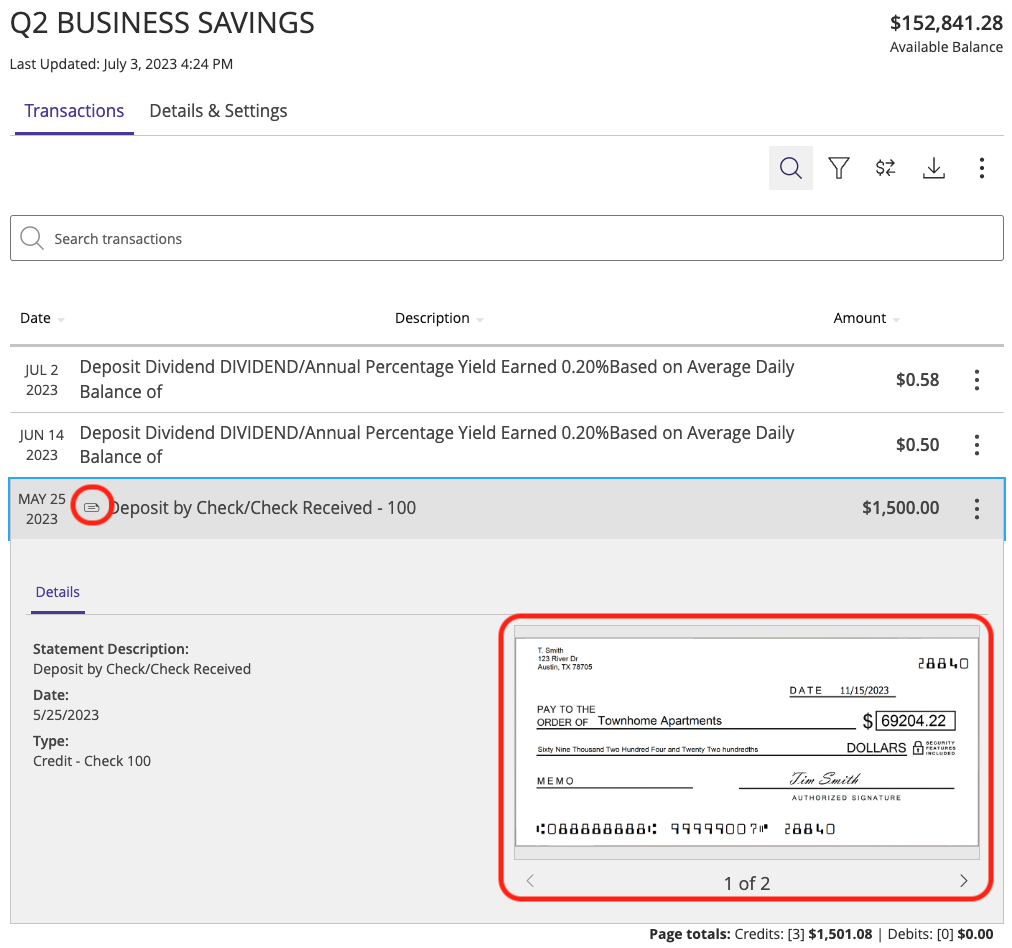
The CheckImage adapter type is invoked when clicking on a transaction with an image attached:
First, let’s create the extension:
q2 create_extension
New Extension Name: CheckYourself
What type of extension are you creating?

    1) Online (default)
    2) SSO (Third Party Integration)
    3) Ardent (API)
    4) Q2Console (Backoffice)
    5) Central (Legacy Backoffice)
    6) Adapter <--------
    7) Audit Action
    8) Custom Health Check
    9) Message Bus
    10) Caliper API Custom Endpoint
    11) Base Extension

Please make a selection and press Return [1]: 6

Select adapter type to generate

    1) Account Details
    2) Authentication Token
    3) Check Image <--------
    4) Domestic Wire
    5) Deposit Item Image
    6) FX Rate
    7) Instant Payments
    8) International Wire
    9) Remote Deposit
    10) Statement Image

Please make a selection and press Return: 4
A simple adapter, there is only one method necessary to override:
async def get_check_images(self, check_image_request: CheckImageRequest) -> list[CheckImage]:
CheckImageRequest is an object with the metadata of the check being requested (check_number, amount, etc), and your responsibility is to return one or more
CheckImage instances (for instance, a front and back image). By default, a mock front and back image are provided as per the screenshot above.
After a quick q2 install, your extension will be registered with the platform and will handle requests for check images when viewing transaction details.
To test, run the sdk service with q2 run and log into your sandbox Online Banking. On the landing page, click on the Q2 Business Savings account to view the transaction history.
You should see a check transaction with a check icon (see the image above for reference). Your Check Image adapter will only receive a request once that transaction is clicked.